Scrcpy vs Vysor: Which Android Screen Mirroring Tool Is Best for Your PC?
Scrcpy is the better tool for most users. It delivers up to 120fps at under 70ms latency, supports audio forwarding and screen recording, runs on Windows, macOS, and Linux — and costs nothing. Vysor is easier to set up but locks wireless mirroring, HD quality, and ad removal behind a paid Pro plan.
Both tools mirror and control your Android device from a PC. Which one fits you depends on whether you want zero-friction setup or maximum performance with zero cost. This guide covers every feature, version, pricing difference, and use case so you can decide fast.
Scrcpy vs Vysor: Feature Comparison at a Glance
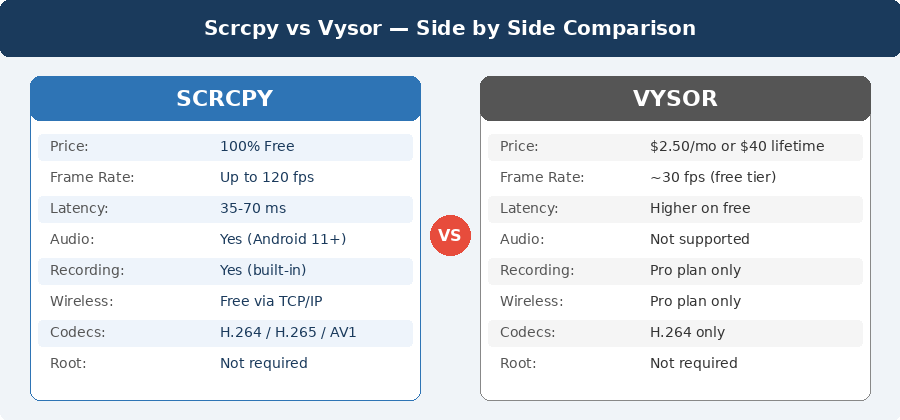
| Feature | Scrcpy | Vysor |
| Price | Completely Free | Free (limited) / Pro from $2.50/mo |
| Open Source | Yes — Apache 2.0 | No — Proprietary |
| Max Frame Rate | Up to 120 fps | ~30 fps free / better on Pro |
| Latency (USB) | 35–70 ms | Higher, especially on free tier |
| Root Required | No | No |
| Wireless Mirroring | Free via TCP/IP | Pro plan only |
| Audio Forwarding | Yes (Android 11+) | No |
| Screen Recording | Yes (built-in) | Pro version only |
| Ads | None | Yes on free version |
| OS Support | Windows, macOS, Linux | Windows, macOS, Linux (web) |
| Phone App Required | No | Yes (companion app) |
| Video Codecs | H.264, H.265, AV1 | H.264 only |
| Virtual Display | Yes (latest version) | No |
| Setup Type | Command-line / ADB | GUI — plug and play |
| Latest Stable Version | v3.3.x | v5.0.7 |
Scrcpy Version History
Scrcpy has been actively maintained with consistent major updates since its first public release. Here are the most important versions:
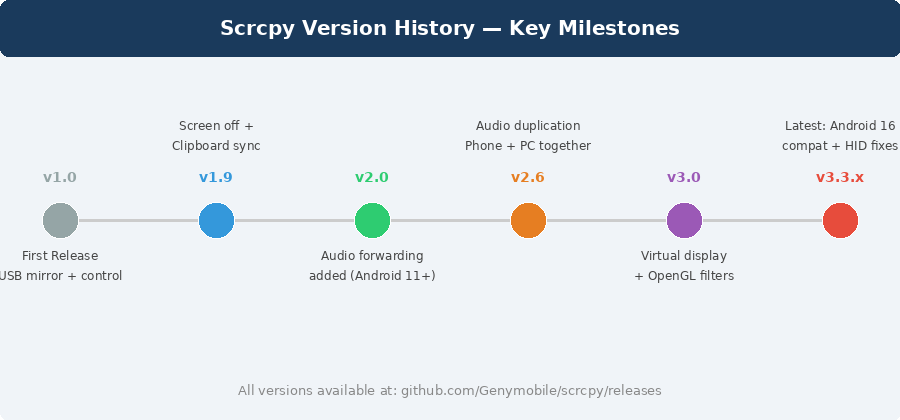
| Version | Key Features Added |
| v1.0 (first release) | Basic screen mirroring and Android remote control via USB |
| v1.9 | Turn screen off while mirroring, clipboard sync between PC and Android |
| v1.x series | Wi-Fi/TCP-IP support, screen recording, keyboard/mouse control, bit-rate control |
| v2.0 | Audio forwarding introduced — Android 11 and above supported |
| v2.1 | Microphone as audio source, audio output buffer size control, OpenGL 3.0+ macOS |
| v2.6 | Audio duplication — hear sound on both phone and PC at the same time |
| v3.0 | Virtual display, OpenGL video filters, launch Android apps on start |
| v3.3.x (latest) | HID mouse improvements, horizontal scroll, Android 16 compatibility fixes |
Every version is archived on the official GitHub releases page. Old versions of Scrcpy for Windows, macOS, and Linux are all downloadable from there — no unofficial mirrors needed.
What Is Vysor?
Vysor is a proprietary Android screen mirroring app developed by Koushik Dutta (Koush) of ClockworkMod. It lets you view and control your Android (and iOS) device from your desktop through a clean, point-and-click GUI interface. No terminal required.
Vysor works by installing a companion app on your Android device and connecting it to the desktop client via USB or Wi-Fi. The free version includes basic mirroring with ads and compressed resolution. The Pro version unlocks HD quality, wireless mirroring, drag-and-drop file transfer, and screen recording.
Vysor Version History
Vysor started as a Chrome browser extension and evolved into a standalone desktop application across these key releases:
| Version | Platform | Key Changes |
| v1.x | Chrome Extension | Original release — required Chrome browser to function |
| v2.x (v2.3.2) | Chrome Extension | Final Chrome extension version — still downloadable |
| v3.1.4 | Standalone Desktop App | First independent desktop app for Windows — 87.9 MB |
| v4.1.77 | Standalone Desktop App | Performance improvements and updated wireless features |
| v5.0.7 (latest) | Standalone Desktop App | Current stable release — Windows and macOS |
Old versions of Vysor for Windows and macOS are available on Softonic and Filehorse. Old Vysor Android APK files are available on APKPure, Uptodown, APKCombo, and APK4Fun.
Performance: Scrcpy vs Vysor Head to Head
Frame Rate
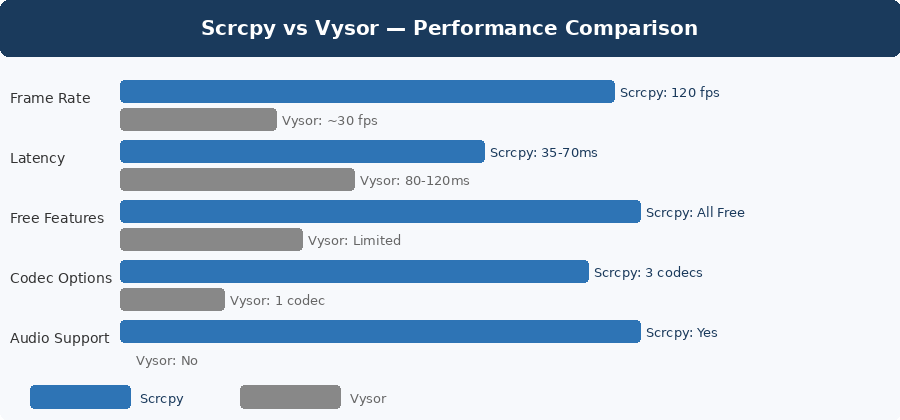
Scrcpy supports up to 120 fps at resolutions above 1920×1080. This makes it fast enough for gaming, live app testing, and any interaction that needs instant response. Frame rate and resolution are both configurable from the command line.
Vysor’s free version caps around 30 fps with visibly compressed resolution. The Pro version improves significantly, but independent tests show Scrcpy still leads on raw throughput.
Latency
Scrcpy’s USB latency is 35–70 ms — fast enough to feel instant during normal use. Over Wi-Fi, latency increases based on your router and network quality. On a 5GHz network, latency stays responsive.
Vysor shows higher latency on the free tier. The Pro version reduces this, but Scrcpy consistently performs better for latency-sensitive tasks like gaming or live debugging.
System Resource Usage
Scrcpy is lightweight by design. Video encoding runs on the Android device hardware (H.264/H.265 hardware encoders), so your PC only handles decoding and display. CPU usage on the PC stays low even at high resolutions.
Feature Breakdown: 9 Key Differences
1. Price — Scrcpy Wins
Scrcpy is 100% free with no feature limits, no ads, and no subscription. Vysor uses a freemium model. The free plan includes ads and locked resolution. The Pro plan starts at $2.50/month, $10/year, or $40 as a one-time lifetime purchase.
2. Setup — Vysor Wins
Vysor takes under 2 minutes. Download the desktop app, install the Android companion app, enable USB debugging, plug in the cable — done. No terminal needed.
Scrcpy requires enabling USB debugging in Developer Options, running from a terminal or command prompt, and optionally setting up ADB over Wi-Fi for wireless use.
3. Audio Forwarding — Scrcpy Wins
Scrcpy includes real-time audio forwarding for Android 11 and above. The audio duplication mode plays sound on both the device and PC simultaneously. Vysor has no audio support at all.
4. Wireless Mirroring
Scrcpy supports wireless mirroring over TCP/IP for free. Run one ADB command to switch from USB to Wi-Fi mode. Vysor requires the Pro plan for wireless access.
5. Screen Recording — Scrcpy Wins
Scrcpy records directly to MP4 with a single command-line flag. No third-party software needed. Vysor includes screen recording only in the Pro plan.
6. Virtual Display — Scrcpy Only
Scrcpy’s latest version added virtual display support. This creates a second screen on your Android device independently of the physical display. Vysor has no virtual display support.
7. Video Codec Options — Scrcpy Wins
Scrcpy supports 3 codecs: H.264 (default), H.265 (better compression), and AV1 (most efficient on supported hardware). Vysor uses H.264 only.
8. Platform Support
Scrcpy runs natively on Windows, macOS, and Linux. Vysor officially supports Windows and macOS through the desktop app, and Linux through a web browser interface only.
9. Open Source vs Proprietary
Scrcpy’s full source code is public on GitHub under the Apache 2.0 license. Anyone can audit it, fork it, or contribute. Vysor is closed-source — you cannot verify what it does with your device data.
Vysor Pricing Plans
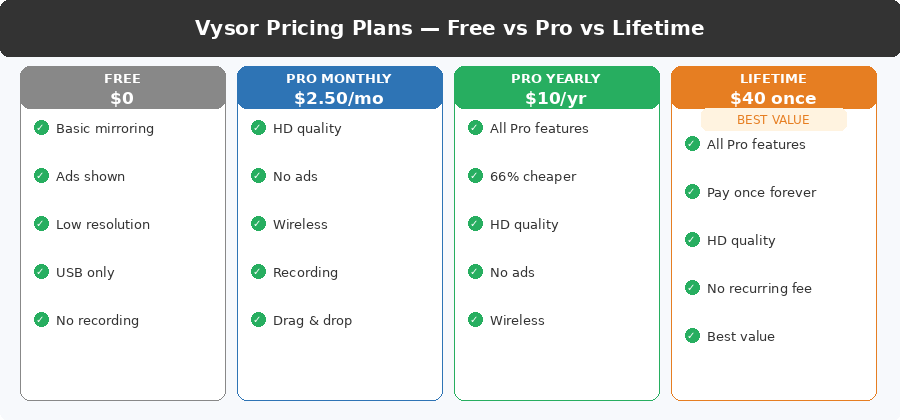
| Plan | Price | Key Features |
| Free | No cost | Basic mirroring, ads shown, compressed resolution, USB only |
| Pro Monthly | $2.50 / month | HD quality, wireless, no ads, screen recording, drag-and-drop files |
| Pro Yearly | $10 / year | All Pro features — saves 66% vs monthly |
| Pro Lifetime | $40 one-time | All Pro features forever — no recurring charge |
| Enterprise | Per user / month (min 5 users) | Pro features + Vysor Share for team device farms, remote ADB access |
Scrcpy has no pricing tiers. All features — including wireless mirroring, audio forwarding, screen recording, and virtual display — are free with no account required.
Scrcpy or Vysor: Who Should Use Which?
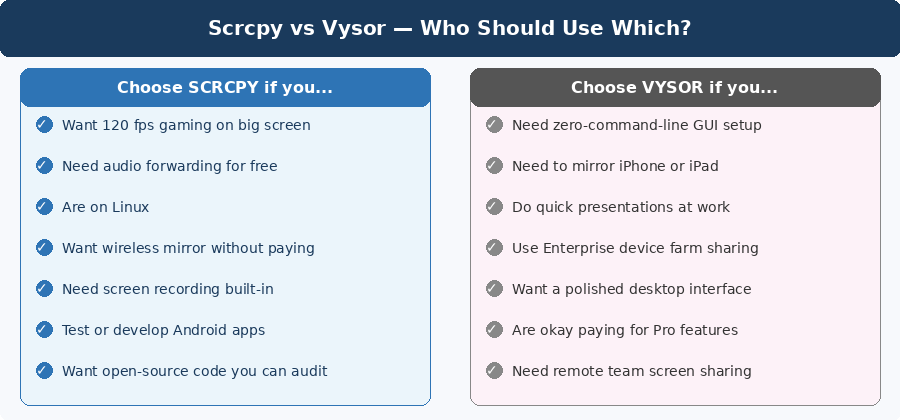
Scrcpy: Best for These 5 Users
- Developers testing Android apps and needing low-latency, high-frame-rate real device control
- Gamers who want to play Android games on a big screen at 60–120 fps
- Linux users — Scrcpy is the only tool with full native Linux support
- Users who want wireless mirroring and audio forwarding without paying anything
- Anyone who needs to record phone screen directly to MP4 for tutorials or demos
Vysor: Best for These 4 Users
- Non-technical users who need a working mirror in under 2 minutes with no terminal
- Business professionals doing quick phone screen presentations or remote support
- Teams using the Enterprise plan for shared device farms and remote ADB access
- iOS users — Vysor supports iPhone and iPad mirroring, Scrcpy does not
How to Set Up Scrcpy: Step-by-Step
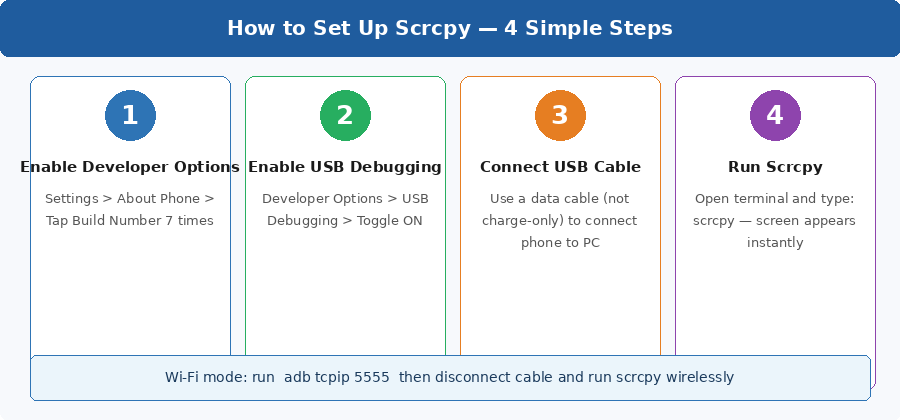
- Enable Developer Options on your Android phone — go to Settings > About Phone and tap Build Number 7 times.
- Enable USB Debugging inside Developer Options.
- Connect your phone to the PC with a USB data cable (not a charge-only cable).
- Run scrcpy from your terminal or command prompt — the phone screen appears on your PC instantly.
For Wi-Fi mode: run adb tcpip 5555, disconnect the cable, then run scrcpy wirelessly using your phone’s IP address.
How to Download Scrcpy
Latest Version
Go to github.com/Genymobile/scrcpy/releases and download the latest release. Choose the Windows .zip, macOS .tar.gz, or install via package manager on Linux (apt install scrcpy or brew install scrcpy on macOS).
Old Versions of Scrcpy
All previous Scrcpy versions are archived under the Releases tab on GitHub — every single one from v1.0 to the current release. You can also find old Windows builds on scrcpy.en.uptodown.com/windows/versions.
How to Download Vysor
Latest Version
Download the desktop app for Windows or macOS from vysor.io/download. The Android companion app is available on the Google Play Store.
Old Versions of Vysor (Desktop)
Previous Vysor desktop versions for Windows are available on Softonic and Filehorse. Versions go back to v3.1.4 and the Chrome extension era.
Old Versions of Vysor APK (Android)
All historical Vysor Android companion APK files are available on APKPure, Uptodown, APKCombo, and APK4Fun. These are useful if the latest APK is incompatible with an older Android version.
Best Scrcpy and Vysor Alternatives
| Tool | Price | Best For |
| KDE Connect | Free / Open Source | Linux users — deep Android-PC integration |
| QtScrcpy | Free / Open Source | Scrcpy with a GUI wrapper — easier for beginners |
| guiscrcpy | Free / Open Source | Scrcpy with GUI on Linux and Windows |
| AirDroid | Free / Paid Pro | Wireless + remote access + file management |
| Phone Link (Windows) | Free | Windows 11 users with Samsung or other select phones |
| TeamViewer | Free (personal) | True remote internet access — not just local mirror |
Final Verdict: Scrcpy vs Vysor
Scrcpy is the better tool for 9 out of 10 users. It outperforms Vysor on frame rate, latency, codecs, audio, recording, and virtual displays — all for free. The only genuine trade-off is setup: Scrcpy requires a terminal and basic ADB knowledge. Vysor earns its place for non-technical users who need a working mirror in 2 minutes, for iOS device mirroring, and for enterprise teams using Vysor Share for remote device management. The Pro lifetime plan at $40 is fair value for those users.
If you are comfortable running a command line, download Scrcpy. If you need iOS support or want zero setup friction, Vysor Pro is worth the cost.
Frequently Asked Questions