Download SCRCPY Free — Latest Version (v3.3.4)
SCRCPY is a free, open-source tool that lets you mirror and control your Android device directly from your Windows, macOS, or Linux computer. No root required, no paid subscription — just download, connect, and start mirroring in minutes.
What You Need Before Downloading
Before you download SCRCPY, make sure your setup meets the basic requirements to avoid errors on first launch.
Supported Android Versions
SCRCPY works on any Android device running Android 5.0 (API 21) or higher. For audio forwarding support, your device must run Android 11 (API 30) or above.
Enable USB Debugging on Your Phone
USB debugging must be enabled on your Android device before SCRCPY can connect. Go to Settings → About Phone and tap Build Number seven times to unlock Developer Options. Then go to Settings → Developer Options and turn on USB Debugging.
Samsung / OnePlus / Vivo
On most Samsung, OnePlus, and Vivo devices the steps above work without any extra configuration. Accept the RSA key prompt on your phone when you connect to your PC for the first time.
Xiaomi / Redmi (Extra Step Required)
On Xiaomi and Redmi devices you must enable one additional setting. Inside Developer Options, also turn on USB Debugging (Security Settings). Without this, SCRCPY will connect but keyboard and mouse input will not work.
Download SCRCPY — Choose Your Platform
Download SCRCPY for Windows
Windows 64-bit (Recommended)
Most modern Windows computers run 64-bit. Download the latest scrcpy-win64-v3.3.4.zip file directly from the official GitHub Releases page.
Windows 32-bit
If you are on an older machine, download scrcpy-win32-v3.3.4.zip instead. Both versions include ADB so no separate installation is needed.
Verify Your Download (Checksum)
To confirm your file is safe and complete, compare its SHA256 checksum against the value listed on the official GitHub Releases page. This step protects you from corrupted or tampered downloads.
Download SCRCPY for macOS
Apple Silicon (M1, M2, M3)
Download the scrcpy-macos-arm64 build for all Apple Silicon Macs. This version is optimized for M-series chips and runs significantly faster than the Intel build on these devices.
Intel Mac
If your Mac uses an Intel processor, download the scrcpy-macos-x86_64 build instead.
Download SCRCPY for Linux
Ubuntu / Debian
On Ubuntu and Debian based systems you can install directly from the package repository without downloading a ZIP file.
Fedora / Arch
Fedora and Arch Linux users can install SCRCPY through their respective package managers. Arch users can also find it on the AUR.
How to Install SCRCPY on Windows
Step 1 — Extract the ZIP File
Right-click the downloaded ZIP file and select Extract All. Choose a simple location like your Desktop or a dedicated tools folder.
Step 2 — Connect Your Android Phone via USB
Plug your Android phone into your PC using a USB cable. On your phone, tap Allow when prompted to authorize the USB debugging connection.
Step 3 — Run scrcpy.exe
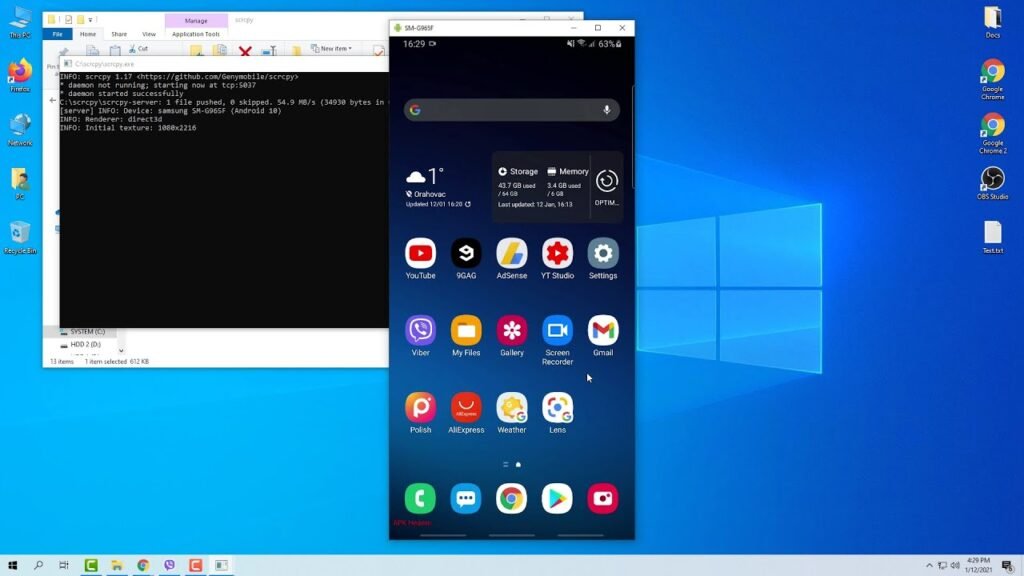
Open the extracted folder and double-click scrcpy.exe. A command prompt window will appear briefly followed by your phone screen appearing in a new window on your desktop.
First Launch — What You Should See
Your Android screen should appear within a few seconds. You can now control your phone using your mouse and keyboard directly from your PC.
How to Install SCRCPY on macOS
Method 1 — Install via Homebrew (Easiest)
Open Terminal and run brew install scrcpy. Homebrew automatically installs all dependencies including ADB. This is the recommended method for most Mac users.
Method 2 — Manual Install from ZIP
Download the ZIP, extract it, and run the scrcpy binary from Terminal. You may need to allow it in System Settings → Privacy & Security on first launch.
Connect and Launch on macOS
Connect your phone via USB, open Terminal, type scrcpy and press Enter. Your phone screen will appear on your Mac within seconds.
How to Install SCRCPY on Linux
Install via Terminal (Ubuntu / Debian)
Run sudo apt install scrcpy in your terminal. This installs SCRCPY along with ADB automatically.
Install via Terminal (Fedora / Arch)
On Fedora run sudo dnf install scrcpy. On Arch run sudo pacman -S scrcpy or install via the AUR using your preferred helper.
Connect and Launch on Linux
Connect your phone, open a terminal, and run scrcpy. Your device screen will mirror to your desktop immediately.
How to Use SCRCPY Over WiFi (No USB Needed)
Step 1 — Enable ADB Wireless Mode
Connect your phone via USB first, then open a terminal or command prompt and run adb tcpip 5555. This switches ADB to listen over your network.
Step 2 — Find Your Phone IP Address
On your phone go to Settings → About Phone → Status → IP Address. Note down the IP address shown.
Step 3 — Connect Wirelessly
Run adb connect YOUR_PHONE_IP:5555 then run scrcpy. You can now unplug the USB cable — SCRCPY will continue running over WiFi.