Scrcpy vs Samsung DeX: Full Comparison
scrcpy gives better screen mirroring performance than Samsung DeX for PC, and works on any Android device — not just Samsung phones. Samsung DeX gives you a full desktop environment with resizable windows, a taskbar, and app management that scrcpy cannot replicate on its own.
That is the short answer. Below is the full breakdown — including what Samsung did to DeX in One UI 7 and One UI 8, how to use scrcpy to run DeX on your PC today, and which tool fits your specific use case.
Scrcpy Version History – All Major Releases
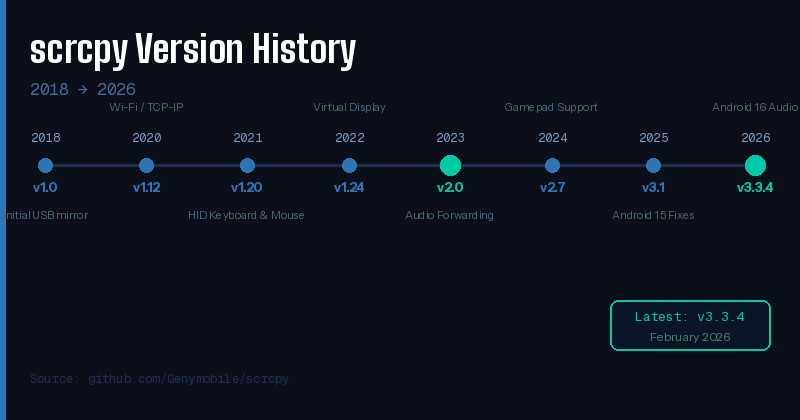
Figure 3: scrcpy version timeline — v1.0 (2018) to v3.3.4 (2026)
scrcpy has been actively developed since 2018, growing from a basic USB mirror tool into a full-featured Android control platform supporting audio, camera, gamepad, and virtual displays.
| Version | Release | Key Change |
| v1.0 | 2018 | Initial USB screen mirroring — no audio |
| v1.12 | 2020 | Wi-Fi / TCP-IP support added |
| v1.20 | 2021 | Physical keyboard & mouse (HID) |
| v1.24 | 2022 | Virtual display support introduced |
| v2.0 | 2023 | Audio forwarding (Android 11+) |
| v2.3 | 2023 | Camera mirroring added |
| v2.7 | 2024 | Gamepad support |
| v3.0 | Late 2024 | –new-display flag, stable virtual displays |
| v3.1 | 2025 | Android 15 fixes, capture orientation |
| v3.3.4 (Latest) | Feb 2026 | Android 16 audio fix, Debian stable |
What Is Samsung DeX?
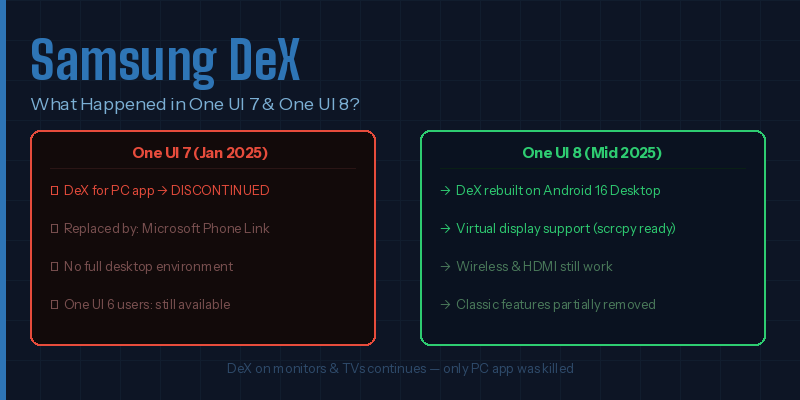
Figure 4: Samsung DeX status — what changed in One UI 7 and One UI 8
Samsung DeX (Desktop Experience) is Samsung’s built-in feature that turns compatible Galaxy phones and tablets into a desktop-like environment. Connect the phone to a monitor via HDMI or USB-C, add a keyboard and mouse, and the phone runs a full windowed interface — resizable apps, a taskbar, desktop wallpaper, and multi-window support.
Introduced: 2017 with Samsung Galaxy S8
Works on: Samsung Galaxy S, Z Fold, Note, Tab (selected models)
Connection: HDMI, USB-C, wireless (Miracast)
DeX for PC app: Discontinued with One UI 7 (January 2025)
Current status: One UI 8 rebuilt DeX on Android 16 Desktop Mode
Scrcpy vs Samsung DeX — Feature Comparison
| Feature | scrcpy | Samsung DeX |
| Cost | Free & open source | Free (Samsung only) |
| Device support | Any Android 5.0+ | Samsung Galaxy only |
| OS support | Windows, macOS, Linux | Monitor/TV + PC app (killed in One UI 7) |
| Latency | Under 35ms (USB) | Higher — users report lag on DeX for PC |
| Audio | Yes (Android 11+) | Yes |
| Root required | No | No |
| Desktop UI | No (mirrors phone screen) | Yes — taskbar, windowed apps, resize |
| Virtual display | Yes (–new-display) | Yes (One UI 8 + Android 16) |
| Works without Samsung | Yes | No |
| Setup | CLI / ADB required | Plug-and-play on monitor |
5 Key Differences Between scrcpy and Samsung DeX
1. Device Compatibility
scrcpy works with any Android 5.0+ phone — Samsung, Xiaomi, OnePlus, Google Pixel, Oppo, and others. Samsung DeX works exclusively with selected Samsung Galaxy devices: Galaxy S8 and later, Z Fold series, Note series from Note 8, and select Tab models.
2. Desktop Interface
Samsung DeX creates a true desktop environment — resizable windows, a persistent taskbar, pinned apps, and a dedicated desktop launcher. scrcpy mirrors whatever is on the phone’s screen. It does not create a desktop UI by default, though using –new-display on One UI 8 phones loads the DeX interface inside scrcpy.
3. Performance and Latency
scrcpy consistently outperforms DeX for PC. Samsung community members testing both side-by-side on the same USB cable found scrcpy sharper and more responsive. The official DeX app added noticeable image compression and latency. scrcpy uses ADB (Android Debug Bridge) directly, which is faster.
4. Setup Complexity
Samsung DeX on a monitor is plug-and-play — connect the cable, DeX launches automatically. scrcpy requires enabling Developer Options, activating USB debugging, downloading the tool, and running it via command line. It is more technical but still straightforward for most users.
5. Samsung’s Decision to End DeX for PC
With One UI 7 in January 2025, Samsung officially ended support for the DeX for PC Windows app. Samsung’s own support page states: the DeX for PC on Windows OS ends support from One UI 7. Samsung redirected users to Microsoft Phone Link — but Phone Link does not replicate the full DeX desktop environment.
With One UI 8 in mid-2025, Samsung rebuilt DeX on Android 16’s native Desktop Mode. This new DeX runs on virtual displays — exactly what scrcpy’s –new-display flag taps into, giving users DeX on a Windows PC again without any Samsung app.
How to Use scrcpy to Run Samsung DeX on PC
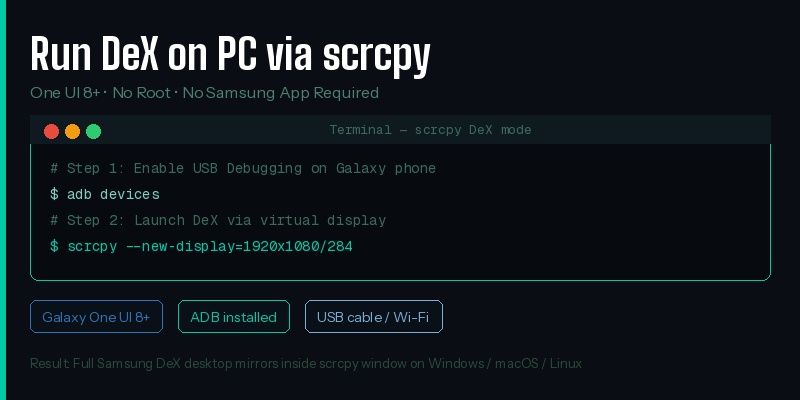
Figure 5: Terminal commands to run DeX on PC via scrcpy
This method works on Galaxy phones running One UI 8 or later with Android 16. No root is required.
Requirements
- Samsung Galaxy device running One UI 8 or later
- scrcpy installed on Windows, macOS, or Linux
- ADB (Android Debug Bridge) set up
- USB cable or Wi-Fi connection
Steps to Launch DeX via scrcpy
- Enable Developer Options: Settings > About Phone > tap Build Number 7 times.
- Enable USB Debugging in Developer Options.
- Connect the Galaxy phone to the PC via USB cable.
- Accept the USB debugging authorization prompt on the phone.
- Open Terminal or Command Prompt on the PC.
- Run: scrcpy –new-display=1920×1080/284
- DeX mode loads on the virtual display and mirrors to the PC window.
Mouse, keyboard, audio, and clipboard all work through scrcpy. No Samsung software needed.
Is Samsung Killing DeX?
Partially yes, partially no. Samsung killed the DeX for PC Windows app with One UI 7 in January 2025 — confirmed on Samsung’s official support page. No new DeX for PC downloads are available for One UI 7 or later devices.
DeX itself is not dead. One UI 8 rebuilt the DeX experience on Android 16’s native Desktop Mode. The new DeX lacks several classic features — no window snap to top, no right-click taskbar settings, and reduced MultiStar integration. Android Authority confirmed only 4 proprietary DeX components remain: the touchpad, wallpaper settings, S Pen integration, and wireless display connectivity.
Long-term, switching to Android’s native Desktop Mode reduces Samsung’s maintenance burden and ties DeX to Google’s broader desktop Android strategy. If Google improves Desktop Mode, DeX improves automatically.
Is Samsung DeX Better Than Screen Mirroring?
Yes — Samsung DeX is fundamentally different from and better than screen mirroring for productivity. Screen mirroring duplicates the phone’s mobile interface onto a larger display. DeX creates a separate desktop environment optimized for keyboard and mouse input.
DeX gives you 4 things screen mirroring does not: resizable app windows, a persistent taskbar, multi-window management, and a dedicated desktop launcher. For documents, spreadsheets, or email on a large screen, DeX is significantly more practical.
scrcpy is screen mirroring at its core — but with –new-display on One UI 8 phones, it loads DeX mode on the virtual display, making it closer to DeX than simple mirroring.
Scrcpy or Samsung DeX: Which One Should You Use?
Use scrcpy if:
- Your phone is not a Samsung Galaxy device
- You need the lowest latency screen mirroring available
- You want Linux or macOS support
- You are a developer testing apps on a physical Android device
- You want to record your screen or use the phone’s camera as a webcam
- You want DeX on a PC with a One UI 8 Galaxy phone (via –new-display)
Use Samsung DeX if:
- You have a compatible Samsung Galaxy phone or tablet
- You want a true desktop environment with windowed apps and a taskbar
- You are connecting to a monitor, TV, or HDMI display directly
- You prefer plug-and-play — no command line setup
Frequently Asked Questions
Is Samsung DeX better than screen mirroring?
Yes — Samsung DeX is better than screen mirroring for productivity. Screen mirroring shows the mobile interface on a larger screen. DeX creates a full desktop environment with resizable windows, a taskbar, and keyboard and mouse support. For multitasking across 3+ apps or working on documents, DeX is significantly more usable.
Is Samsung killing DeX?
Samsung killed DeX for PC (the Windows app) with One UI 7 in January 2025. DeX itself continues on monitors and TVs. One UI 8 rebuilt DeX on Android 16 Desktop Mode — but removed several classic features. The original PC app is permanently discontinued.
Can scrcpy run Samsung DeX on a PC?
Yes — on Galaxy devices running One UI 8 or later, running scrcpy –new-display=1920×1080/284 launches DeX mode in a virtual display that mirrors to the PC. Works on Windows, macOS, and Linux without root or any Samsung software.
Does scrcpy work without USB?
Yes — scrcpy connects via Wi-Fi using TCP/IP. Run adb tcpip 5555 on the phone, then adb connect [phone-IP]:5555 on the PC, and launch scrcpy normally. Wi-Fi adds slightly more latency than USB but works for most tasks.
Which Samsung phones support DeX in 2025?
Samsung DeX supports Galaxy S8 and all later S series, Z Fold series (all generations), Note series from Note 8, and selected Galaxy Tab models from Tab S4 onwards. DeX does not work on Galaxy A, Galaxy M, or non-Samsung Android devices.
What replaced DeX for PC after One UI 7?
Samsung recommended Microsoft Phone Link as the official replacement. Phone Link handles calls, texts, and selected apps from a Windows PC wirelessly — but does not provide the full DeX desktop environment. For a true DeX-on-PC experience on One UI 8+ devices, scrcpy with –new-display is the best available workaround.
Conclusion
scrcpy and Samsung DeX solve different problems. scrcpy is the better tool for screen mirroring — faster, sharper, works on every Android device, runs on Windows, macOS, and Linux, completely free. Samsung DeX is the better tool for a desktop replacement — full windowed apps, a taskbar, and plug-and-play operation on monitors and TVs.
The landscape shifted significantly in 2025. Samsung ended DeX for PC with One UI 7 and rebuilt DeX in One UI 8 on Android 16’s Desktop Mode. Classic features were removed. But scrcpy filled that gap — running –new-display on a One UI 8 phone now gives you DeX on your PC without any Samsung app.
For non-Samsung users, there is no contest: scrcpy is the answer. For Samsung Galaxy owners connecting to a monitor for real desktop work, DeX still delivers what no mirroring tool can. Use both if your setup allows it.